



Configuring a per-site WAF policy with IP address restriction rules: Part one
Introduction
I recently worked with a client who had multiple public-facing Internet Information Services (IIS) websites hosted on an Azure® virtual machine (VM). The client wanted to restrict inbound internet access to one specific website by specifying a set of allowed external IP addresses and leave the traffic flow for the other websites unaffected.
A common approach to achieve this is to use an Application Gateway web application firewall (WAF) in front of the target VM. Then, create a per-site WAF policy with an IP-based access control rule and assign it to the Application Gateway and the listener that corresponds to
the particular website’s hostname.
An IP–based access control rule is a custom WAF rule that lets you control access to your web applications. It does this by specifying a list of IP addresses or IP address ranges in Classless Inter-Domain Routing (CIDR) format
By assigning WAF policies to a listener, you can configure WAF settings for individual sites without the changes affecting every site. The most specific policy takes precedence. Suppose there is a global policy and a per-site policy (a WAF policy associated with a listener). In that case, the per-site policy overrides the global WAF policy for that listener. Other listeners without their own policies are affected by only the global WAF policy.
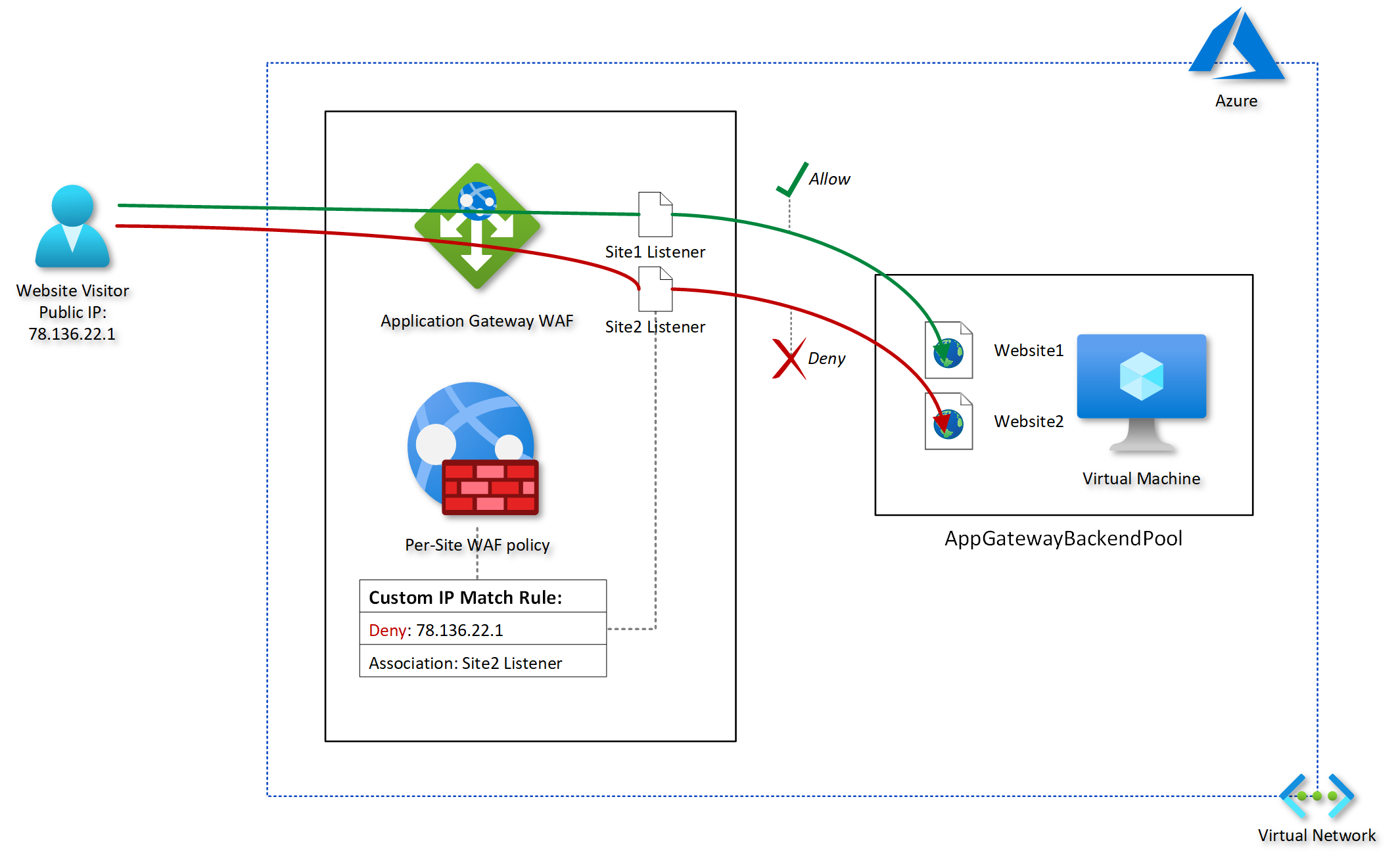
In this series of posts, I run through a simplified configuration to demonstrate how to apply a per-site WAF policy to an Application Gateway to control inbound access based on IP-based restrictions to one of two test IIS websites running on a single Windows VM.
The following diagram provides a conceptual illustration of my goal:
Implementation walkthrough
This three-post series covers the following elements of the implementation walkthrough:
- Introduction
- Assumptions
Application Gateway configuration:
- Web application firewall
- Backend pool
- HTTP settings
- Frontend IP configurations
- Listeners
- Rules
- WAF policy configuration
- Testing the custom rule
- Conclusion
Assumptions
The following items are already in place, so I won’t cover the provisioning steps for these items in this walkthrough:
- A Windows; Azure VM
- IIS installed and bindings configured for two test website URLs (site1.hiteshvadgama.co.uk and site2.hiteshvadgama.co.uk)
- An Application Gateway WAF (v2)
- DNS records updated to map website domains to the public IP address of the Application Gateway
Next steps
Post 2: In this series covers the Application Gateway configuration.
Explore Related Articles

Design a Connected Healthcare Cloud for Epic, Data and AI
Explore how a connected healthcare cloud can help you bring Epic, data, analytics and AI together while keeping the environment
Read article

Right Workload, Right Place for Regulated Industries
Strategic workload placement helps regulated organizations maintain control, demonstrate resilience and govern AI in production.
Read article

Governing AI Agents Starts With the Infrastructure Beneath Them
Explore the identity, access, policy and operational controls that help organizations deploy AI agents safely across critical infrastructure.
Read article

The Cyberattacks That Never Cross Your Firewall
Discover how Rackspace Managed Digital Risk Monitoring helps identify threats beyond your network, using human-led intelligence to assess risks and
Read article