



To inspire developers, we’re sharing an example of a methodical and streamlined approach for integrating Backstage.io with AWS accounts.
Introduction
Embarking on the Backstage.io platform journey introduces several initial challenges, notably, establishing an interaction mechanism with your cloud service provider. This post will shed light on the approach Rackspace Technology uses to seamlessly integrate Amazon Web Services (AWS) accounts with Backstage, a cornerstone for enabling a smooth and efficient development workflow.
Our objective
Our goal is straightforward, yet vital:
- Enable Backstage and CI/CD pipelines to interact with AWS services.
- Ensure services are discoverable within Backstage.
- Maintain simplicity and efficiency, minimizing input for maximum output.
This endeavor led to the creation of one of our initial Backstage templates, designed to facilitate platform adoption and simplify cloud interactions.
Our approach
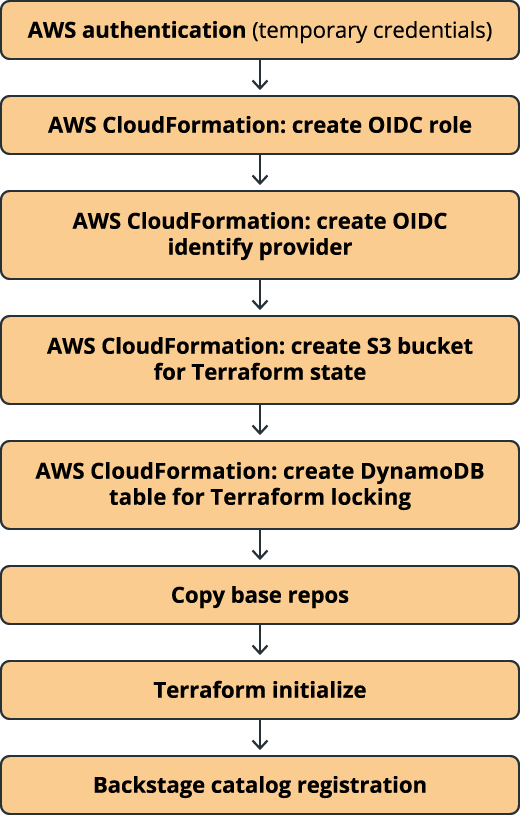
While there are numerous potential strategies for integrating cloud services, we’re sharing a method tailored for rapid MVP development. It’s not a one-size-fits-all solution. It’s a blueprint that has significantly benefited many of our projects, serving as an inspiration for other implementation strategies. A high-level view of our workflow includes the following:
Prerequisites
To kickstart the process, you’ll need:
- AWS credentials: Temporary access credentials for the target AWS account
- AWS region: The deployment target region is typically US-EAST-1
AWS authentication
Authenticating against AWS is the first step, which requires the following:
- An existing AWS account
- An IAM role for Backstage to assume
- A user account providing temporary credentials to Backstage
This setup enables the injection of credentials into the Backstage bootstrap template, laying the groundwork for further actions.
Credential handling
Using the Rackspace Technology custom action, aws:get: credentials, we parse and load the provided AWS credentials as environment variables. The credentials are then authenticated against AWS APIs, securing Backstage’s access to AWS services.
Infrastructure automation
- ASW CloudFormation for AWS IAM role creation: We automate the deployment of necessary AWS Identity and Access Management (IAM) roles through ASW CloudFormation, adhering to a naming convention and ensuring a least-privilege access model.
- OICD identity provider setup: Establishing an OpenID Connect and OpenID Provider bridge GitHub actions with AWS IAM roles.
- S3 and DynamoDB setup: Essential for managing Terraform states and ensuring concurrent operation safety, we create S3 buckets and DynamoDB tables following specific naming conventions.
Repository structure
Our template organizes the repository into distinct layers, catering to different aspects of infrastructure and service deployment, including:
- /bootstrap: For initial setup scripts
- /foundation: For core network and landing zone configurations
- /services: For deploying and managing service-specific resources
- /fullstack: For comprehensive templates spanning multiple infrastructure layers
This structure not only simplifies development but also aligns with best practices for infrastructure as code (IaC).
Backstage catalog registration
To finalize the process, we register the newly configured entity within Backstage’s software catalog, making it visible and manageable through the platform.
Conclusion
Our journey through the integration of AWS accounts with Backstage underscores the importance of a methodical and streamlined approach. By sharing our experience, we hope to empower developers to build robust, efficient, and scalable solutions, leveraging Backstage’s full potential to enhance their development ecosystems.
Explore Related Articles

Design a Connected Healthcare Cloud for Epic, Data and AI
Explore how a connected healthcare cloud can help you bring Epic, data, analytics and AI together while keeping the environment
Read article

Right Workload, Right Place for Regulated Industries
Strategic workload placement helps regulated organizations maintain control, demonstrate resilience and govern AI in production.
Read article

Governing AI Agents Starts With the Infrastructure Beneath Them
Explore the identity, access, policy and operational controls that help organizations deploy AI agents safely across critical infrastructure.
Read article

The Cyberattacks That Never Cross Your Firewall
Discover how Rackspace Managed Digital Risk Monitoring helps identify threats beyond your network, using human-led intelligence to assess risks and
Read article